
The SZOOMSY SZ-VX20 PTZ Camera supports both USB and HDMI output, making it easy to connect to OBS Studio for live streaming and video recording.
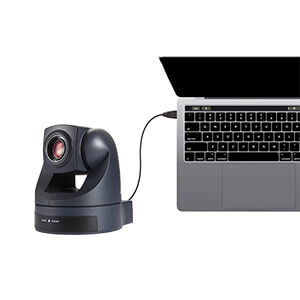
USB Direct Connection
Simply connect the camera to your computer using a USB 3.0 cable.
OBS will recognize the camera automatically as a UVC video device.
Best for
- Live streaming
- Online meetings
- Teaching
- Beginners
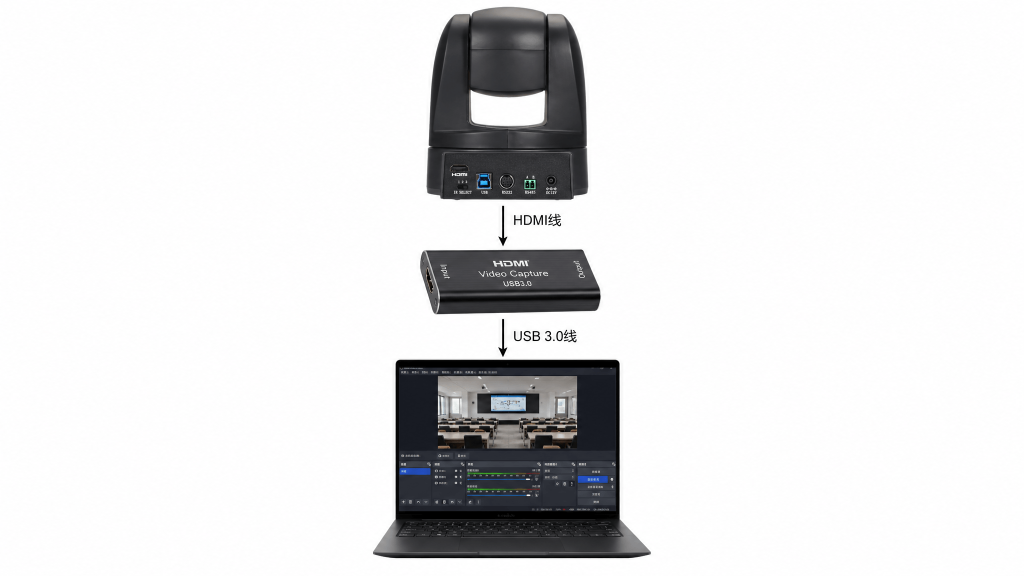
HDMI Capture Card-SZ-VX20 PTZ Camera
Use HDMI together with a capture card for more stable and professional live production.
Best for
- Church streaming
- Events
- Broadcast
- Long-duration streaming
| Method | Hardware | Best For |
|---|---|---|
| USB | None | Beginners |
| HDMI | Capture Card | Professional Streaming |
| USB + HDMI | Capture Card | Broadcast Production |